The Best Construction Apps in 2026, Compared
Procore for a GC running the whole project. Fieldwire if you work off drawings; it has a free plan. Raken for daily reports and time cards. Contractor Foreman for office tools on a small budget, Buildertrend for home builders, CompanyCam for job photos. Dozer, which we make, is last because it does a narrower job: watching the site and drafting the daily report and JHA.
Updated November 2026. Every price below was read on the company’s own pricing page on November 21, 2026, and each one links to it.
We make Dozer, so we put it last. The list runs from the apps that cover the most of a contractor's work to the one that does a narrower job: Dozer is built around the job site itself, the cameras, the machines and the day's paperwork, priced per site instead of per person. For drawings, time cards, estimating and running a whole project, the others are the better pick.
| App | Best for | Price, Nov 2026 | iPhone / Android / web | Free tier | Standout | Catch |
|---|---|---|---|---|---|---|
| Procore | A GC running the whole project | Quote only, annual contract, unlimited users | Yes / Yes / Yes | None | Drawings, RFIs, submittals, budgets and daily logs in one system | No public price; a lot of system for a small crew |
| Fieldwire | Crews who work off the drawings | $0, then $39, $64 or $89 a user a month, billed annually | Yes / Yes / Yes | Yes: 5 users, 3 projects, 100 sheets | Plan viewer tied to tasks, punch lists and inspections | Reports and exports start at $39 a user |
| Raken | Daily reports and time cards for field crews | $23 or $59 a user a month, billed annually, 3 users minimum | Yes / Yes / Yes | None listed | Branded daily report PDFs; subs file their own reports free | Time cards and safety are on the $59 plan |
| Contractor Foreman | Small GCs and trades who want the office side for less | $49 a month for 1 user, up to $332 for unlimited, billed annually | Yes / Yes / Yes | 30-day free trial | Scheduling, job costing, RFIs and AI estimates at a low price | Lowest App Store rating here: 4.3 |
| Buildertrend | Home builders and remodelers | Quote only, unlimited users and projects | Yes / Yes / Yes | None | Client portal, selections, schedules and daily logs | No public price; aimed at builders running 5+ projects a year |
| CompanyCam | Job photos for contractors and trades | $63 a month for 1 user; $119 or $249 with 3; $29 per added user, billed annually | Yes / Yes / Yes | Free trial | Timestamped photos sorted by job; AI reports from photos and voice | Built around photos; the $63 plan stops at 2 users |
| Dozer | A site you want watched, with machines and daily paperwork to keep up | Per site, not per user. See pricing | Yes / Yes / Yes, plus the office TV | On the pricing page | Reads your site camera pictures; drafts the daily report and the JHA | No drawings, RFIs, time cards or estimating. Too new for store ratings |
We started from the apps that the current top results for “best construction apps” name most often, then kept the ones a contractor actually runs a job with. Every app here had to:
- run on an iPhone, an Android phone and in a web browser, so the field and the office use the same thing;
- help on the site, not only in the office;
- say plainly who it’s built for and how it’s priced, or have that called out here when it doesn’t publish a price.
What we checked, on November 20 and again on November 21, 2026 (prices and ratings): each company’s pricing page, its feature pages (listed under Sources), and each app’s App Store and Google Play listing. We opened every store listing to confirm it’s that company’s app, and the App Store ratings below are read from those listings that day. For Dozer, the facts come from our own product and its pricing page.
What we didn’t do: we didn’t buy a plan or run a trial of each competitor, so nothing here claims a test result. Where a company describes its own product, we say so.
We left out apps that do one office job only: time clocks like Workyard, ClockShark and Connecteam, estimating tools, and calculator apps. They’re useful, but they aren’t what you run the job site on.
1. Procore: best for a GC running the whole project
Procore runs the whole project in one system: the current drawing set with automatic sheet naming and hyperlinking, RFIs and submittals, budgets and change orders, schedules, and daily logs. Its mobile tools keep full offline functionality on remote sites, and daily logs and timecards can be GPS-stamped.
- Pricing: quote only. Procore sells an annual contract with unlimited users, unlimited data and 24/7 support; its Field Productivity product is priced by full-time employees.
- Strengths: owners, subs and vendors can all join without adding to the bill, and almost every project document lives in one place.
- Weaknesses: no public price, a contract for the year, and far more system than a small crew needs for the daily and the photos.
- Who it’s for: general contractors and owners who manage drawings, submittals and money across many projects.
- App Store rating: 4.6 from 46,877 ratings (read November 21, 2026).
2. Fieldwire: best for crews who work off the drawings
Fieldwire, owned by Hilti, is built around the plan set. You view drawings on the web, iOS or Android with versioning and automatic hyperlinks between sheets, then hang tasks, punch lists and inspections on them. Markups and as-builts work offline, and forms cover daily reports, timesheets and RFIs.
- Pricing: Basic is free for 5 users on 3 projects and 100 sheets. Pro is $39 a user a month, Business $64 and Business Plus $89, billed annually. Reports and exports start on Pro, custom forms and the BIM viewer on Business, and RFIs, submittals, change orders and budgets on Business Plus.
- Strengths: the only real free plan in this list, and the plan viewer is the center of the app instead of an add-on.
- Weaknesses: the free plan can’t export a report, and per-user pricing climbs fast once the whole crew is on it.
- Who it’s for: foremen and project engineers who live in the drawings: electrical, mechanical, interiors, punch-list work.
- App Store rating: 4.8 from 14,097 ratings (read November 21, 2026).
3. Raken: best for daily reports and time cards
Raken is a field-first app built around the construction daily report. The foreman logs work, time cards and checklists on a phone with voice-to-text, adds photos and video, and Raken turns it into a branded PDF that it can email to the office and the GC on its own. On every project, your subcontractors can file their own daily reports in Raken for free. It runs on the web, iOS and Android.
- Pricing: Basic is $23 a user a month and Performance $59, both billed annually with a 3-user minimum, so $69 a month at the least. Performance adds time tracking, production tracking, safety and quality management, RFIs, forms and document storage.
- Strengths: the daily report is the product, and it shows. Subs reporting for free is rare.
- Weaknesses: you pay per user for the year, the time cards need the $59 plan, and somebody still types the report.
- Who it’s for: subs and GCs whose field day is the daily report and the hours behind payroll.
- App Store rating: 4.7 from 22,856 ratings (read November 21, 2026).
4. Contractor Foreman: best for office tools on a small budget
Contractor Foreman is an all-in-one construction management app for small and medium residential and commercial trade and general contractors. It covers projects, schedules, job costing, RFIs and submittals, forms and checklists, a CRM, and AI estimates and takeoffs, with links to more than 50 other systems. It runs on a phone, a tablet and a computer.
- Pricing: Basic is $49 a month for 1 user, Standard $105 for up to 3, Plus $166 for up to 8, Pro $221 for up to 15, and Unlimited $332 for unlimited users, all billed annually, with a 30-day free trial.
- Strengths: a long list of office tools, from job costing and RFIs to schedules and estimates, at a published price that starts at $49 a month.
- Weaknesses: its App Store rating is the lowest in this list, and those prices are for a year paid up front.
- Who it’s for: small GCs and trades who want estimates, schedules and job costing without a Procore bill.
- App Store rating: 4.3 from 561 ratings (read November 21, 2026).
5. Buildertrend: best for home builders and remodelers
Buildertrend runs a residential building business: scheduling, daily logs, tasks, a time clock, change orders, selections, warranties and a sub portal, plus a client portal where homeowners see the progress. It also covers sales and financial management.
- Pricing: quote only. You answer a few questions and book a call. Plans include unlimited users and projects, and a special offer on the page takes 10% off when you pay for the year up front.
- Strengths: the client side. Selections and a portal keep homeowners informed without the phone calls.
- Weaknesses: no public price, and by its own pricing page it’s for builders who oversee 5 or more projects a year. Its pages speak to home builders and remodelers first, not sitework or heavy civil.
- Who it’s for: home builders, remodelers and design-build firms.
- App Store rating: 4.5 from 5,142 ratings (read November 21, 2026).
6. CompanyCam: best for job photos
CompanyCam is the photo app for contractors. Photos and videos are timestamped and filed by job automatically, with galleries, timelines and annotations to share with customers and subs. Its AI writes reports, checklists, captions and updates from your photos and voice, and the app works offline and syncs later. It also handles proposals, on-site payments and marketing posts.
- Pricing: Core is $63 a month with 1 user and a 2-user limit. Crew is $119 and Scale $249, each with 3 users. Every added user is $29, all billed annually. Enterprise, for 50 or more users, is quoted. There’s a free trial.
- Strengths: photo proof of work, sorted by job without anyone sorting it, which settles disputes and sells the next job.
- Weaknesses: users add up past the included ones, and the $63 plan stops at 2. Its core is photo documentation, so it’s usually paired with a project management app rather than replacing one.
- Who it’s for: roofers, remodelers, HVAC, restoration and solar crews, and any GC who needs photo proof of every stage.
- App Store rating: 4.8 from 32,392 ratings (read November 21, 2026).
7. Dozer: best for a site you want watched, with the paperwork drafted
We make Dozer, and we put it last because it does a narrower job than the six above. Dozer is an AI foreman for the job site. It reads the pictures from your site cameras and puts what it sees on one board: trucks in and out, machines working, people without hard hats, dust. It runs on any camera that can email a picture, like Reolink, Hikvision and Axis, and a camera takes about five minutes to add. The same board shows on the office TV: open trydozer.com/tv in the TV’s browser and type the 4-letter code from the app. There’s no box to buy.
It keeps the machines too. Hours and service due come from a photo of the hour meter or a typed number, fault codes are explained in plain words, and rentals, attachments and tools show who has them.
Then it drafts the paperwork. The daily report is written from the day’s haul, scale and repair tickets, what the cameras flagged, the weather at the site’s address and whatever the foreman said into the phone. With nothing recorded, the draft is just the weather line; it doesn’t make up the rest. The JHA starts from the day’s work said out loud, and the crew signs it on one phone. Crew cards, SWPPP inspections, site docs and lien deadlines live in the same app, turned on per site.
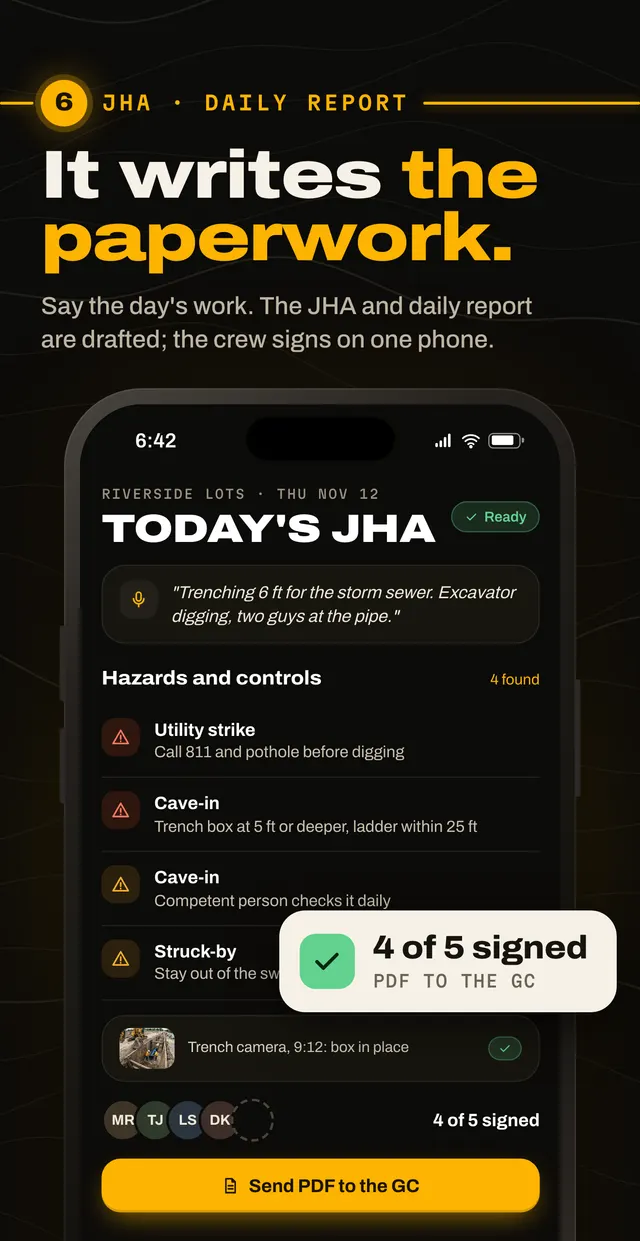
- Pricing: per site, not per user, so the crew and the office don’t change the price. The plans are on the pricing page.
- Strengths: it does the watching and the writing, which most apps leave to a person. One account holds every site a company runs.
- Weaknesses: no drawings or plan viewer, no RFIs, submittals or change orders, no time cards or payroll, no estimating or invoicing. Camera account links (Verkada, Eagle Eye, UniFi) aren’t built yet; cameras send their pictures by email. It’s new to the stores, so it has no App Store ratings yet (read November 21, 2026).
- Who it’s for: sitework, heavy civil, paving, quarries and mines, and any contractor with cameras on site and more paperwork than people.
Which construction app should you pick?
- You’re a GC running RFIs, submittals and budgets for owners: Procore.
- Your day runs off the plan set, or you need a free plan: Fieldwire.
- Your crew’s day is the daily report and the time card: Raken.
- You want estimates, schedules and job costing from $49 a month: Contractor Foreman.
- You build or remodel homes and clients want a portal: Buildertrend.
- You sell and prove your work with photos: CompanyCam.
- You want the site watched, the machines kept up and the daily report and JHA drafted: Dozer.
Plenty of companies run two. A common pair is one app for the office side and one for the field: Procore or Buildertrend with CompanyCam for photos, or any of them with Dozer watching the site. If you’re choosing only for the daily report, our daily report app comparison goes deeper on that one job.
Sources
Read on November 21, 2026.
- Raken pricing and Raken daily reports
- Fieldwire pricing and Fieldwire home page
- Procore pricing and Procore project management
- CompanyCam pricing and CompanyCam home page
- Buildertrend pricing and Buildertrend daily logs
- Contractor Foreman plans and Contractor Foreman home page
- App Store listings: Raken, Fieldwire, Procore, CompanyCam, Buildertrend, Contractor Foreman, Dozer
- Google Play listings: Raken, Fieldwire, Procore, CompanyCam, Buildertrend, Contractor Foreman, Dozer
- Dozer: pricing, jobsite cameras, machines, daily report and JHA